Importing recipes with AI
Your recipes probably already exist somewhere: in a notes app, in a spreadsheet, on a page you can photograph. Import recipes with AI reads them as they are and proposes your product cards, so you do not have to rebuild each one ingredient by ingredient.
Find it on the Product cards page, in the row of buttons above the table.
What you can bring
- Notes pasted into the box from a message, a document or a notes app. One recipe or several.
- A spreadsheet (.xlsx or .csv) in any layout.
- A photo or a PDF of a page, up to 10 MB.
The draft
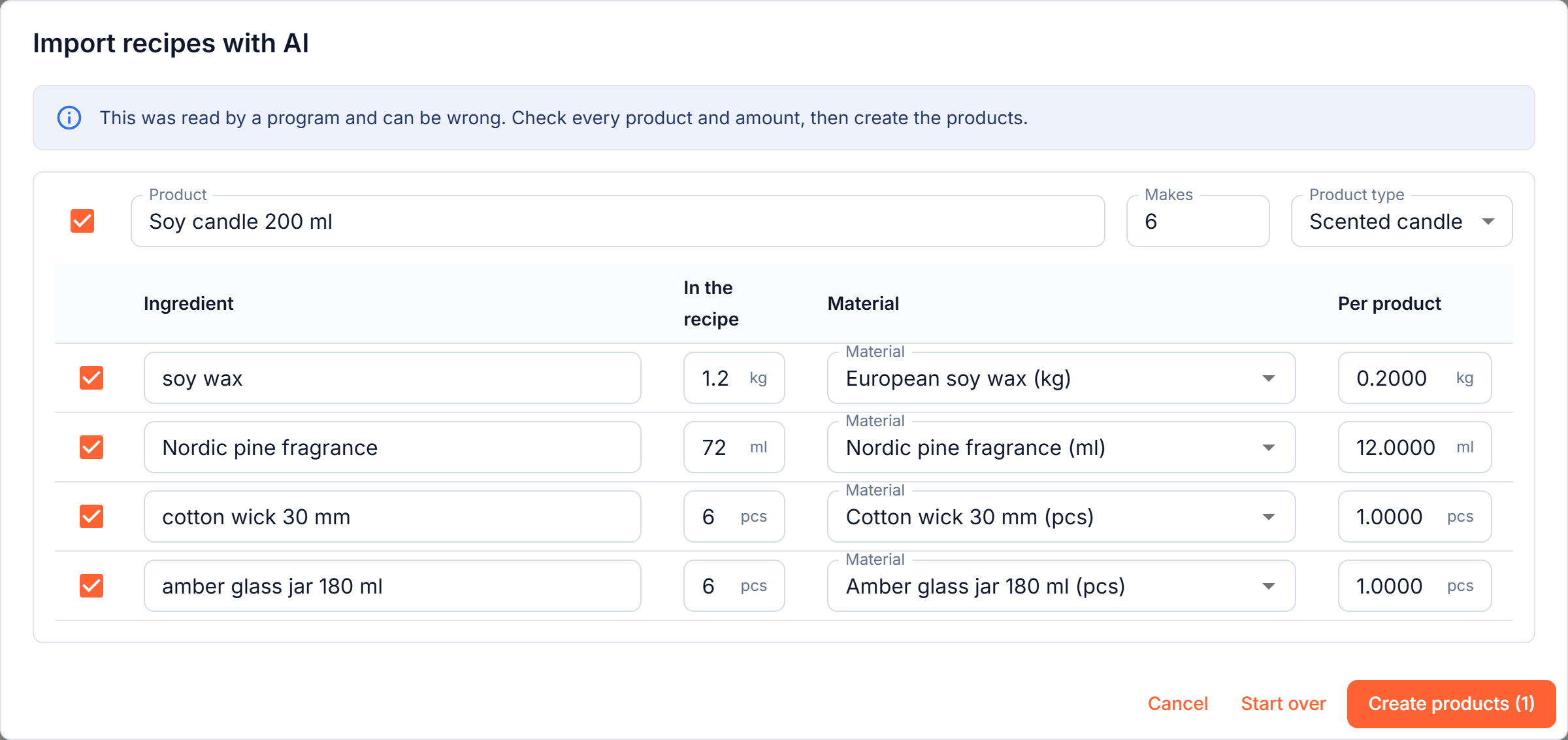
Press Read the recipes. For each recipe you get a product and its ingredients:
- The amount per product is worked out for you. If the recipe makes a batch ("makes 6 candles, 1.2 kg of wax"), the Makes field says 6 and each ingredient shows the amount for one candle, 0.2 kg of wax. Change Makes or an amount and the figures follow.
- Units are converted. A recipe in grams for a material you keep in kilograms is converted. When two units cannot be converted (grams for a material kept in millilitres, which would need a density), the row is marked Units differ and you enter the amount yourself.
- Ingredients are matched to your materials. The program looks for the material you already have that means the same thing, even if it is written differently. When it is not sure, the ingredient is left as a new material, which you can match yourself with the picker.
- New materials are created for you. An ingredient with no material becomes one, with the unit and type you see on the row.
- Steps, temperatures and notes are left out. Only what is consumed to make the product becomes an ingredient.
Everything is editable. Untick an ingredient or a whole product you do not want, fix a name or a number, then press Create products.
The recipes are read by a program, and a program can be wrong. Check every product and every amount before you create anything.
What it does not do
- It only adds. A product whose name is already one of your product cards is marked Already one of your products and left unticked, and is skipped if you tick it. An existing material is used as it is and never changed.
- It does not read labor, loss or sub-items yet. The cards are created with their materials. Add labor by the minute, loss coefficients and ready items on the card afterwards, see Product cards.
- It makes products, not item cards. An item card (a semi-finished part) is created from the Item cards tab.
Limits and your data
Import with AI, for materials and for recipes together, is included in every plan, up to 10 lists or recipes per workspace per day. The limit starts again at midnight UTC.
Only the file or text you provide and the names of your existing materials and product types are sent to Anthropic, our AI provider, which does not train its models on them. Details are in our privacy policy.