Etsy integration
Masto Control connects to your Etsy shop to keep listing data, prices and stock in step with your workshop inventory, and to import paid Etsy orders as sales.
Connecting your shop
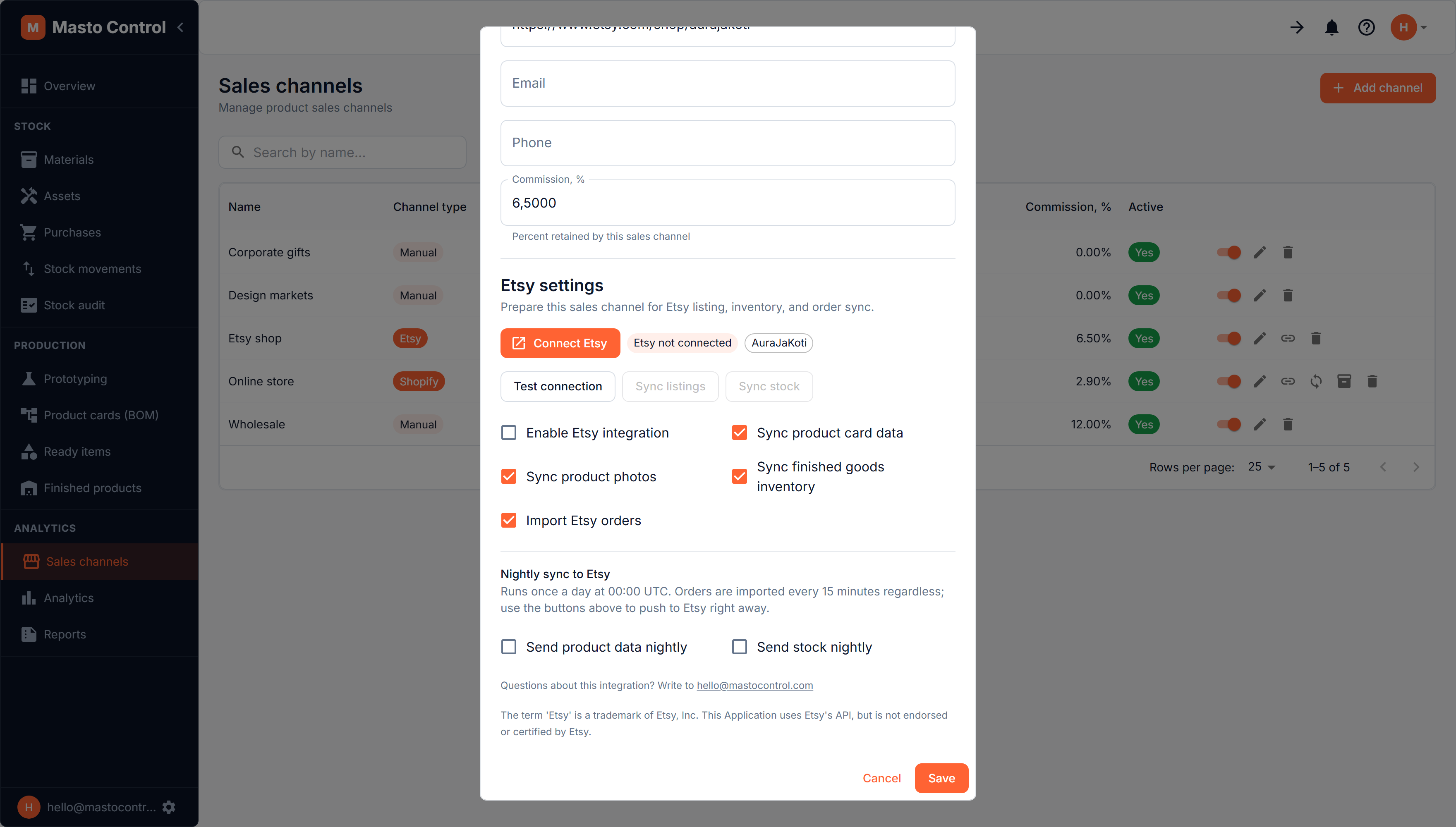
Create a sales channel with type Etsy, save it, then click Connect Etsy. You'll be taken to Etsy's own authorisation screen, where you approve access for your shop, and returned to Masto Control. Nothing is copied by hand — no API keys, no tokens.
If you have already authorised Masto Control from this Etsy account before, Etsy skips the approval screen and returns you immediately. That is normal: the green Etsy connected badge and your shop name are what confirm the connection worked.
Test connection checks the link at any time and shows which shop is attached. Reconnect Etsy re-runs the same flow if you ever need to.
An Etsy shop can be connected to one Masto Control workspace at a time. If the shop is already connected elsewhere, the attempt is refused and nothing is half-connected — disconnect it in the other workspace first, or delete that sales channel to release the shop.
Linking product cards to listings
Sync only touches product cards that are linked to a listing, so this is the step that makes everything else work.
Open Etsy listing links on the channel row. Each product card gets a dropdown of your shop's listings — active, draft and inactive ones — showing each listing's state and current quantity. Pick the one the card corresponds to and press Save. Everything Etsy needs internally is filled in for you.
One listing belongs to one product card: a listing already taken by another card appears greyed out with already linked.
Listings with options (variations)
If a listing has options such as size, colour or material, each option is a separate line in the dropdown, labelled with the option — for example Wax type: Soy and Wax type: Beeswax. Each option can be linked to its own product card, which is what you want when the two variants are genuinely different recipes with different materials and cost.
For listings with options, Masto Control sends only price and stock, and only to the option you linked. Title, description and photos belong to the listing as a whole rather than to one option, so no single product card owns them — you keep editing those on Etsy. The links dialog says the same thing on screen, so you don't have to remember it.
What gets sent to Etsy
Under the channel's Etsy settings you decide what to sync:
- Sync product card data — listing title and description, and the price you set for the Etsy channel on the product card
- Sync product photos — photos from the product card; each photo is uploaded once and remembered, so repeat syncs don't pile up duplicates on Etsy (Etsy allows up to 10 photos per listing)
- Sync finished goods inventory — available stock, meaning what is in stock minus what is reserved
- Import Etsy orders — see below
Two notes worth knowing before your first sync:
- An empty field is never sent. If a product card has no description, Masto Control leaves the description on Etsy untouched instead of clearing it.
- Etsy stock is a whole number, so fractional quantities are rounded down.
When syncing happens
- Orders arrive the moment they are paid: Etsy notifies Masto Control directly, and a check every 15 minutes runs behind it as a safety net in case a notification is ever missed. There is nothing to switch on beyond Import Etsy orders.
- Sending to Etsy happens once a night, at 00:00 UTC, and only if you enable it: Send product data nightly and Send stock nightly are separate switches, both off by default.
- Sync listings and Sync stock buttons push immediately whenever you don't want to wait for the night run.
The nightly schedule is deliberate. Etsy limits how many requests an application may make per day across all connected shops, and updating stock costs several requests per listing, so a constant push would be wasteful. If you need Etsy updated right after producing a batch, use the buttons.
Imported orders
When someone buys from your Etsy shop, the order arrives within seconds and Masto Control:
- Registers the sale against this channel, at the price actually paid
- Deducts the sold items from finished-goods stock, oldest batch first
- Consumes the materials those items were made from, plus any packaging configured for this channel, writing stock movements
- Feeds sales analytics and reports
- Shows a notification in the bell menu
Masto Control reads only what it needs from an order: its number, date, and the items and quantities sold. Buyer names, addresses and emails are not stored, and Masto Control never contacts your buyers.
An order is imported once. If the same order is seen again — which happens routinely, since each check looks slightly further back than the last — it is recognised and skipped.
Cancelled orders
Etsy has no way of telling anyone whether cancelled goods came back to you — from Etsy's side a cancellation is about the money. What Etsy does record is whether the order was ever dispatched, and Masto Control uses that:
- Cancelled before you marked it shipped — the goods never left your workshop, so there is nothing to wait for. Masto Control cancels the sale itself and puts the item, its materials, their reservation and its packaging straight back into stock. You get a notification telling you it happened.
- Cancelled after shipping — the item left, and only you know whether it came back. Masto Control leaves the sale alone and notifies you to decide.
Either way the notification links to the Sales tab under Finished products, where you can cancel the sale yourself and choose whether stock comes back. The same happens if an automatic return can't be applied cleanly — for example if that batch has since been reworked.
Masto Control also notes for itself the moment you mark an Etsy order as shipped. That way, deciding whether a later cancellation may return stock never rests on what a cancelled order still reports about its own history: if we saw it ship, it counts as shipped.
Troubleshooting
"No product card is linked to Etsy listing …" — an order arrived for a listing that isn't linked yet. Link it in Etsy listing links and the order will be imported on the next check; you don't need to do anything else.
"Not enough stock for …" — the order needs more finished goods than you have. Produce or add the missing quantity and the order imports itself on the next check.
"'title' and 'description' are both required for a non-draft listing" — Etsy refuses to clear those fields on a published listing. Fill in the description on the product card, or leave the field empty in Masto Control and it will stop being sent at all.
Sync says skipped — the product card isn't linked to a listing, or has nothing to send (no title, no description, no channel price, no new photos).
A linked listing shows as no longer in the shop — the listing or option was deleted on Etsy. Pick a current one.
If an Etsy connection stays broken for more than an hour, workspace administrators get an email and an in-app notification, so a silently dead sync doesn't go unnoticed.
The term 'Etsy' is a trademark of Etsy, Inc. This application uses Etsy's API, but is not endorsed or certified by Etsy.