<?xml version="1.0" encoding="utf-8"?>
<feed xmlns="http://www.w3.org/2005/Atom">
    <id>https://docs.mastocontrol.com/changelog</id>
    <title>Masto Control: what's new</title>
    <updated>2026-10-01T00:00:00.000Z</updated>
    <generator>https://github.com/jpmonette/feed</generator>
    <link rel="alternate" href="https://docs.mastocontrol.com/changelog"/>
    <subtitle>New features and changes in Masto Control</subtitle>
    <icon>https://docs.mastocontrol.com/img/favicon.png</icon>
    <entry>
        <title type="html"><![CDATA[Turn your recipes into product cards]]></title>
        <id>https://docs.mastocontrol.com/changelog/2026/10/01/import-recipes-with-ai</id>
        <link href="https://docs.mastocontrol.com/changelog/2026/10/01/import-recipes-with-ai"/>
        <updated>2026-10-01T00:00:00.000Z</updated>
        <summary type="html"><![CDATA[On the Product cards page, Import recipes with AI reads your recipes as they are: notes pasted from anywhere, a spreadsheet laid out your own way, or a photo or PDF of a page. Each recipe becomes a product with its ingredients.]]></summary>
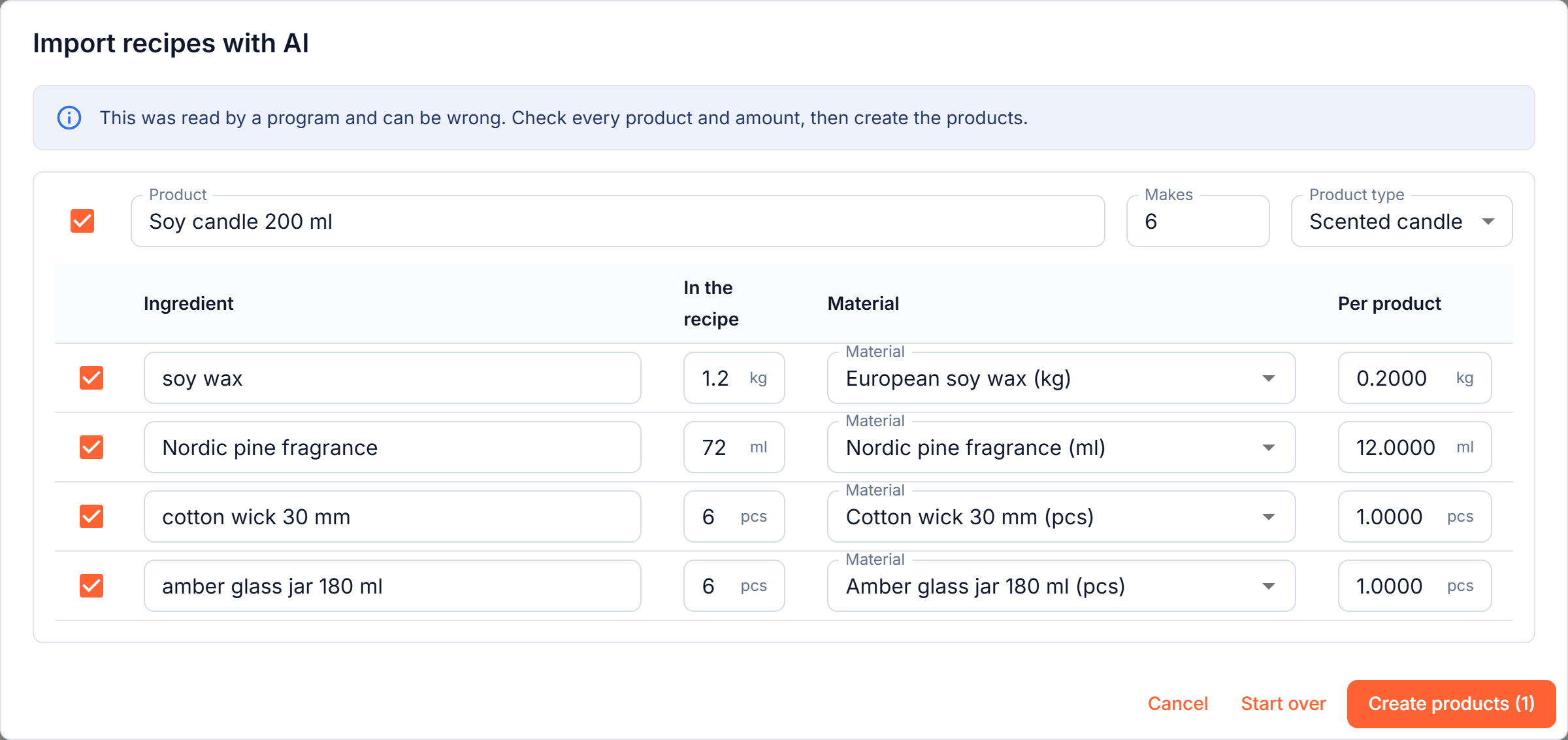
        <content type="html"><![CDATA[<p>On the <strong>Product cards</strong> page, <strong>Import recipes with AI</strong> reads your recipes as they are: notes pasted from anywhere, a spreadsheet laid out your own way, or a photo or PDF of a page. Each recipe becomes a product with its ingredients.</p>
<p>If a recipe makes a batch ("makes 6 candles, 1.2 kg of wax"), the amount for one candle is worked out for you, and units are converted to the ones your materials are kept in. Ingredients are matched to the materials you already have, and the ones you do not have yet are created with the draft. You check and correct everything, and only then are the products created. It never changes a product or material you already have.</p>
<p><img decoding="async" loading="lazy" alt="The recipe import dialog: a batch recipe read into a product with the amount per candle worked out" src="https://docs.mastocontrol.com/assets/images/ai-recipe-dialog-948248dfc56c97845cecf2a70f54ae12.png" width="2400" height="1132" class="img_ev3q"></p>
<p>Included in every plan. <a class="" href="https://docs.mastocontrol.com/production/import-recipes-with-ai">How it works</a></p>]]></content>
        <category label="Production" term="Production"/>
    </entry>
    <entry>
        <title type="html"><![CDATA[Bring your stock list in any shape]]></title>
        <id>https://docs.mastocontrol.com/changelog/2026/10/01/import-with-ai</id>
        <link href="https://docs.mastocontrol.com/changelog/2026/10/01/import-with-ai"/>
        <updated>2026-10-01T00:00:00.000Z</updated>
        <summary type="html"><![CDATA[Starting out no longer means retyping what you already have. On the Materials page, Import with AI reads your list as it is: a spreadsheet laid out your own way, text pasted from your notes, or a photo or PDF of a page.]]></summary>
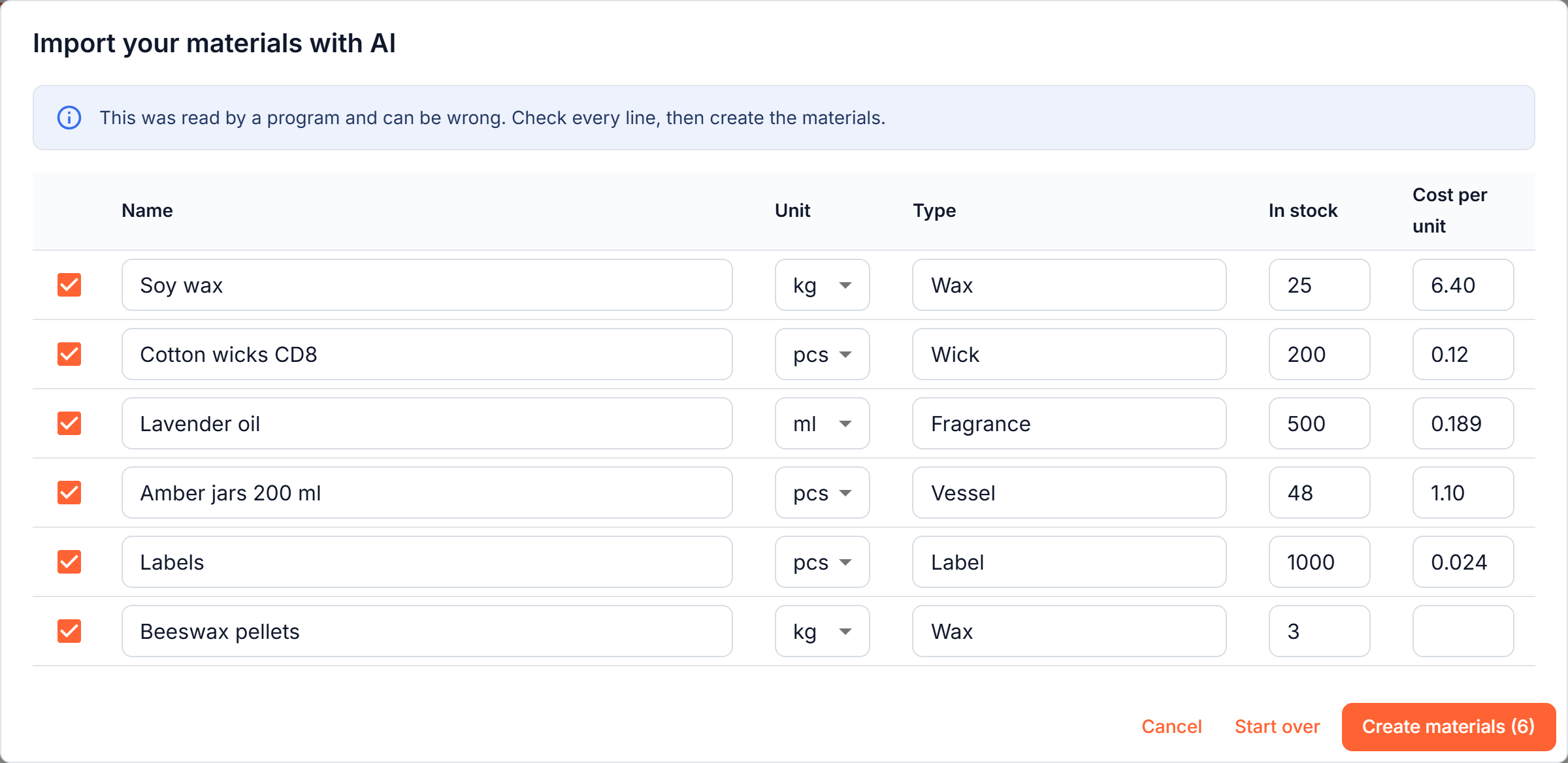
        <content type="html"><![CDATA[<p>Starting out no longer means retyping what you already have. On the <strong>Materials</strong> page, <strong>Import with AI</strong> reads your list as it is: a spreadsheet laid out your own way, text pasted from your notes, or a photo or PDF of a page.</p>
<p>It proposes your materials with units, types, how much you have and what one unit costs. A pack price becomes the price of one piece, "500 g" for a material kept in kilograms becomes 0.5, and titles and totals are left out. You check and correct the draft, and only then are the materials created. It never changes a material you already have.</p>
<p><img decoding="async" loading="lazy" alt="The import dialog: a pasted list read into materials with units, types, stock and prices" src="https://docs.mastocontrol.com/assets/images/ai-import-dialog-5e411305022c229dbe659de292df9a68.png" width="2400" height="1168" class="img_ev3q"></p>
<p>Included in every plan. <a class="" href="https://docs.mastocontrol.com/inventory/import-with-ai">How it works</a></p>]]></content>
        <category label="Inventory" term="Inventory"/>
    </entry>
    <entry>
        <title type="html"><![CDATA[Scan a receipt instead of typing it]]></title>
        <id>https://docs.mastocontrol.com/changelog/2026/09/30/scan-a-receipt</id>
        <link href="https://docs.mastocontrol.com/changelog/2026/09/30/scan-a-receipt"/>
        <updated>2026-09-30T00:00:00.000Z</updated>
        <summary type="html"><![CDATA[You can now photograph a supplier receipt, or upload a PDF, and let Masto Control propose the receipt for you: the supplier, number, date, VAT, the goods, and the delivery charge or discount at the bottom.]]></summary>
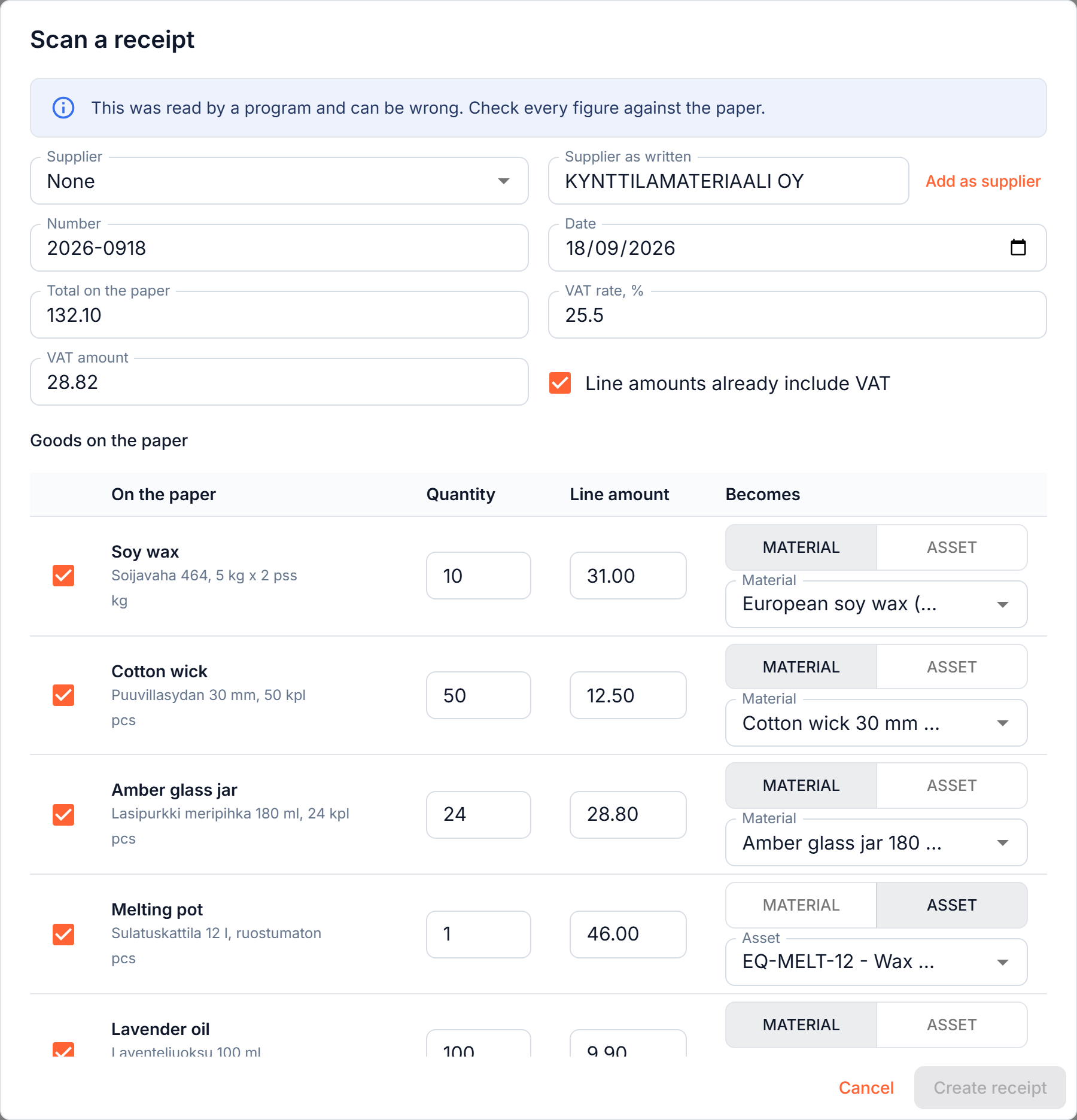
        <content type="html"><![CDATA[<p>You can now photograph a supplier receipt, or upload a PDF, and let Masto Control propose the receipt for you: the supplier, number, date, VAT, the goods, and the delivery charge or discount at the bottom.</p>
<p>Each line is matched to a material or a tool you already have, even when the receipt is in another language, and the names are translated into yours. Packs are worked out for you (two packs of 3 kg of wax comes out as 6 kg), and anything that does not exist yet can be created on the spot. Nothing is saved until you have checked the draft.</p>
<p><img decoding="async" loading="lazy" alt="The scan dialog: a Finnish receipt read into a draft, each line matched to a material or a tool" src="https://docs.mastocontrol.com/assets/images/receipt-scan-dialog-b0933bd665a29f833531c3f8e82d6108.png" width="1800" height="1872" class="img_ev3q"></p>
<p>Included in every plan, up to 10 scans per workspace per day. <a class="" href="https://docs.mastocontrol.com/purchases-and-costs/receipt-scanning">How it works</a></p>]]></content>
        <category label="Purchasing" term="Purchasing"/>
    </entry>
    <entry>
        <title type="html"><![CDATA[Custom-made work on a sales order]]></title>
        <id>https://docs.mastocontrol.com/changelog/2026/09/17/custom-made-lines</id>
        <link href="https://docs.mastocontrol.com/changelog/2026/09/17/custom-made-lines"/>
        <updated>2026-09-17T00:00:00.000Z</updated>
        <summary type="html"><![CDATA[A customer asks for something you do not make: a wedding set, a gift box, a one-off colour. You can now add it as a custom-made line right on a sales order. Describe what goes into it (materials and ready items), and it is costed and taken out of stock when you post the order, without creating a product card you will never use again.]]></summary>
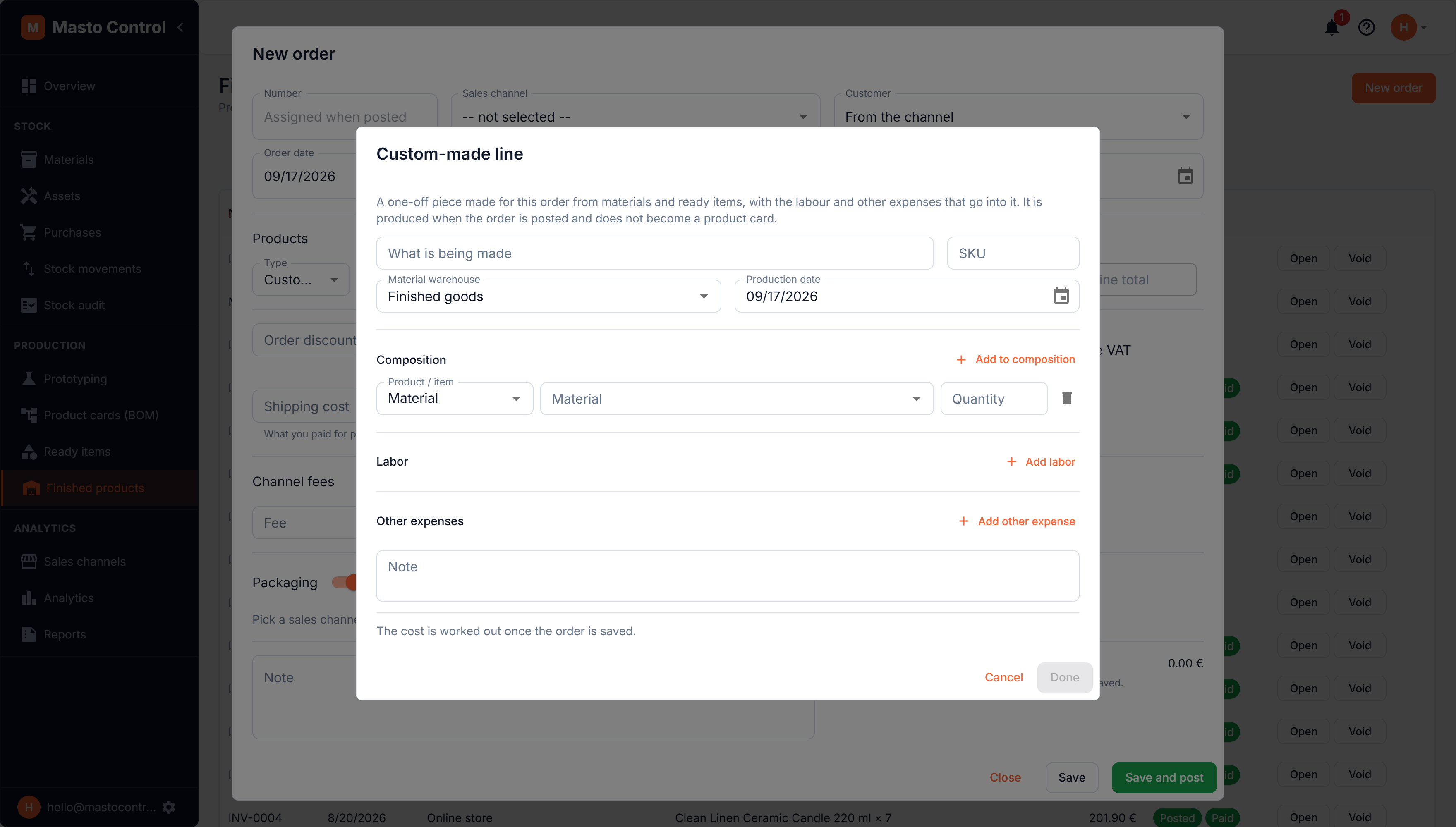
        <content type="html"><![CDATA[<p>A customer asks for something you do not make: a wedding set, a gift box, a one-off colour. You can now add it as a <strong>custom-made line</strong> right on a sales order. Describe what goes into it (materials and ready items), and it is costed and taken out of stock when you post the order, without creating a product card you will never use again.</p>
<p>The separate "custom order" button is gone: it is now simply a line type on <strong>New order</strong>.</p>
<p><img decoding="async" loading="lazy" alt="A custom-made line on a sales order" src="https://docs.mastocontrol.com/assets/images/custom-line-dialog-1ec615a92b827ccc147af2d997a21708.png" width="3520" height="2000" class="img_ev3q"></p>
<p><a class="" href="https://docs.mastocontrol.com/sales-channels/sales-orders#custom-made-lines">Custom-made lines</a></p>]]></content>
        <category label="Sales" term="Sales"/>
        <category label="Production" term="Production"/>
    </entry>
    <entry>
        <title type="html"><![CDATA[Finnish and Swedish]]></title>
        <id>https://docs.mastocontrol.com/changelog/2026/09/12/finnish-and-swedish</id>
        <link href="https://docs.mastocontrol.com/changelog/2026/09/12/finnish-and-swedish"/>
        <updated>2026-09-12T00:00:00.000Z</updated>
        <summary type="html"><![CDATA[Masto Control now speaks eight languages: the interface can be set to Finnish (Suomi) or Swedish (Svenska) as well as English, French, German, Italian, Polish and Spanish. An admin chooses it for the whole workspace under Profile, Settings, Interface language.]]></summary>
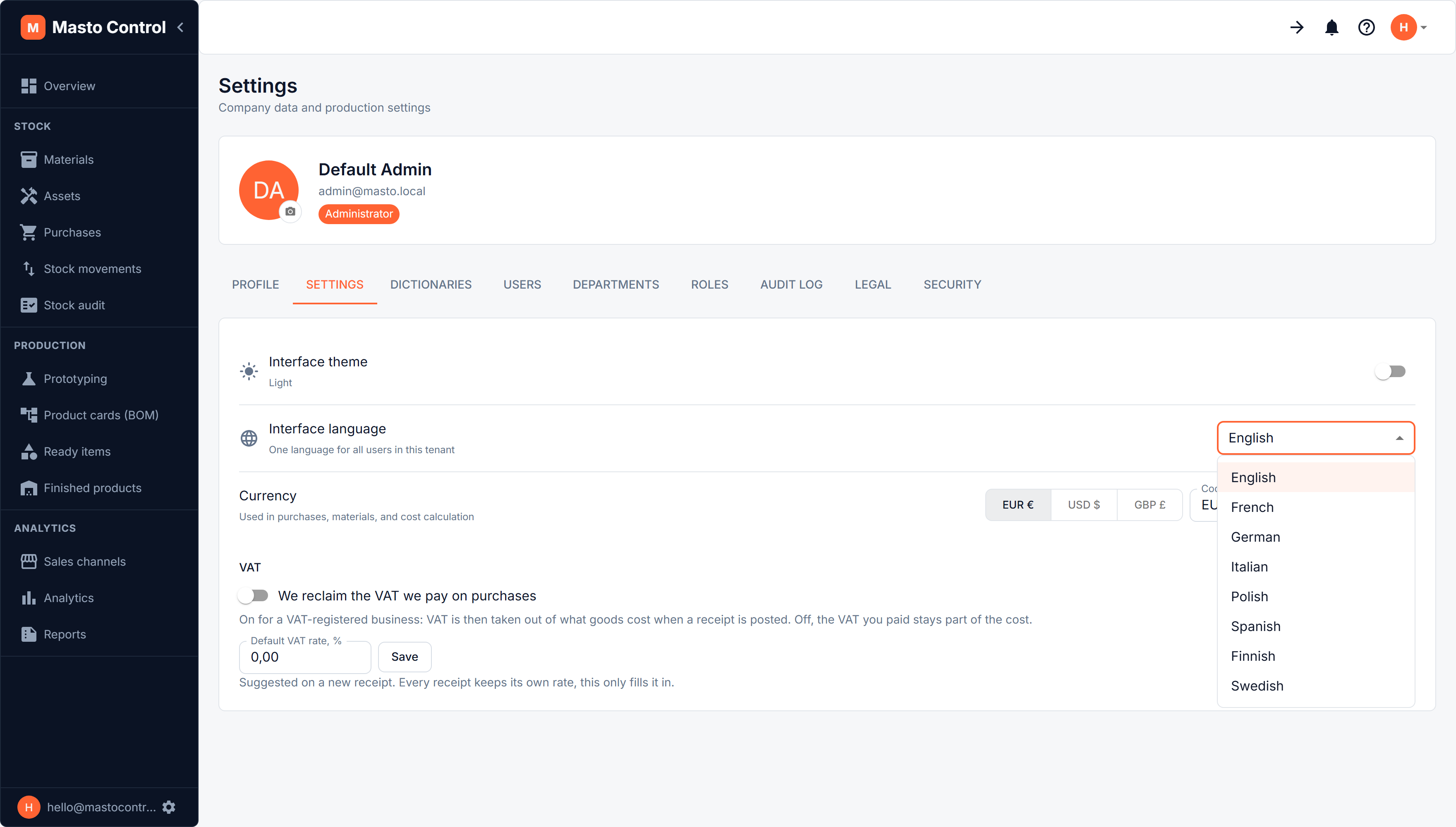
        <content type="html"><![CDATA[<p>Masto Control now speaks <strong>eight languages</strong>: the interface can be set to Finnish (Suomi) or Swedish (Svenska) as well as English, French, German, Italian, Polish and Spanish. An admin chooses it for the whole workspace under <strong>Profile, Settings, Interface language</strong>.</p>
<p>The Finnish and Swedish wording is new; if something reads oddly, tell us at <a href="mailto:hello@mastocontrol.com" target="_blank" rel="noopener noreferrer" class="">hello@mastocontrol.com</a>.</p>
<p><img decoding="async" loading="lazy" alt="The interface language list with eight languages" src="https://docs.mastocontrol.com/assets/images/interface-language-dropdown-1372822de9a0c82361bb97f46591b445.png" width="3520" height="2000" class="img_ev3q"></p>
<p><a class="" href="https://docs.mastocontrol.com/getting-started/interface-language">Interface language</a></p>]]></content>
        <category label="Account" term="Account"/>
    </entry>
    <entry>
        <title type="html"><![CDATA[Two-factor authentication]]></title>
        <id>https://docs.mastocontrol.com/changelog/2026/09/11/two-factor-authentication</id>
        <link href="https://docs.mastocontrol.com/changelog/2026/09/11/two-factor-authentication"/>
        <updated>2026-09-11T00:00:00.000Z</updated>
        <summary type="html"><![CDATA[You can now protect your account with a second step at sign-in: after your password, Masto Control asks for a six-digit code from an authenticator app on your phone. Anyone who learns your password still cannot get in without that phone.]]></summary>
        <content type="html"><![CDATA[<p>You can now protect your account with a second step at sign-in: after your password, Masto Control asks for a six-digit code from an authenticator app on your phone. Anyone who learns your password still cannot get in without that phone.</p>
<p>It is optional and set per account, so turning it on for yourself does not change how your colleagues sign in. Any standard authenticator app works, including Google Authenticator and Microsoft Authenticator.</p>
<p><img decoding="async" loading="lazy" alt="Setting up two-factor authentication with a QR code" src="https://docs.mastocontrol.com/assets/images/two-factor-setup-624dce9a5b1b9cd48f278c8c2db477c1.png" width="1280" height="1116" class="img_ev3q"></p>
<p><a class="" href="https://docs.mastocontrol.com/getting-started/two-factor-authentication">Two-factor authentication</a></p>]]></content>
        <category label="Account" term="Account"/>
    </entry>
    <entry>
        <title type="html"><![CDATA[Reports a bookkeeper can use]]></title>
        <id>https://docs.mastocontrol.com/changelog/2026/09/05/accounting-reports</id>
        <link href="https://docs.mastocontrol.com/changelog/2026/09/05/accounting-reports"/>
        <updated>2026-09-05T00:00:00.000Z</updated>
        <summary type="html"><![CDATA[Reports now covers the questions an accountant asks, not only the ones a maker asks: a Profit report from revenue down to net profit, inventory valuation as of a date you choose, a purchase ledger split into stock, tools and expenses, a fixed-asset register with depreciation, and payables by age. Later additions are the sales ledger and receivables.]]></summary>
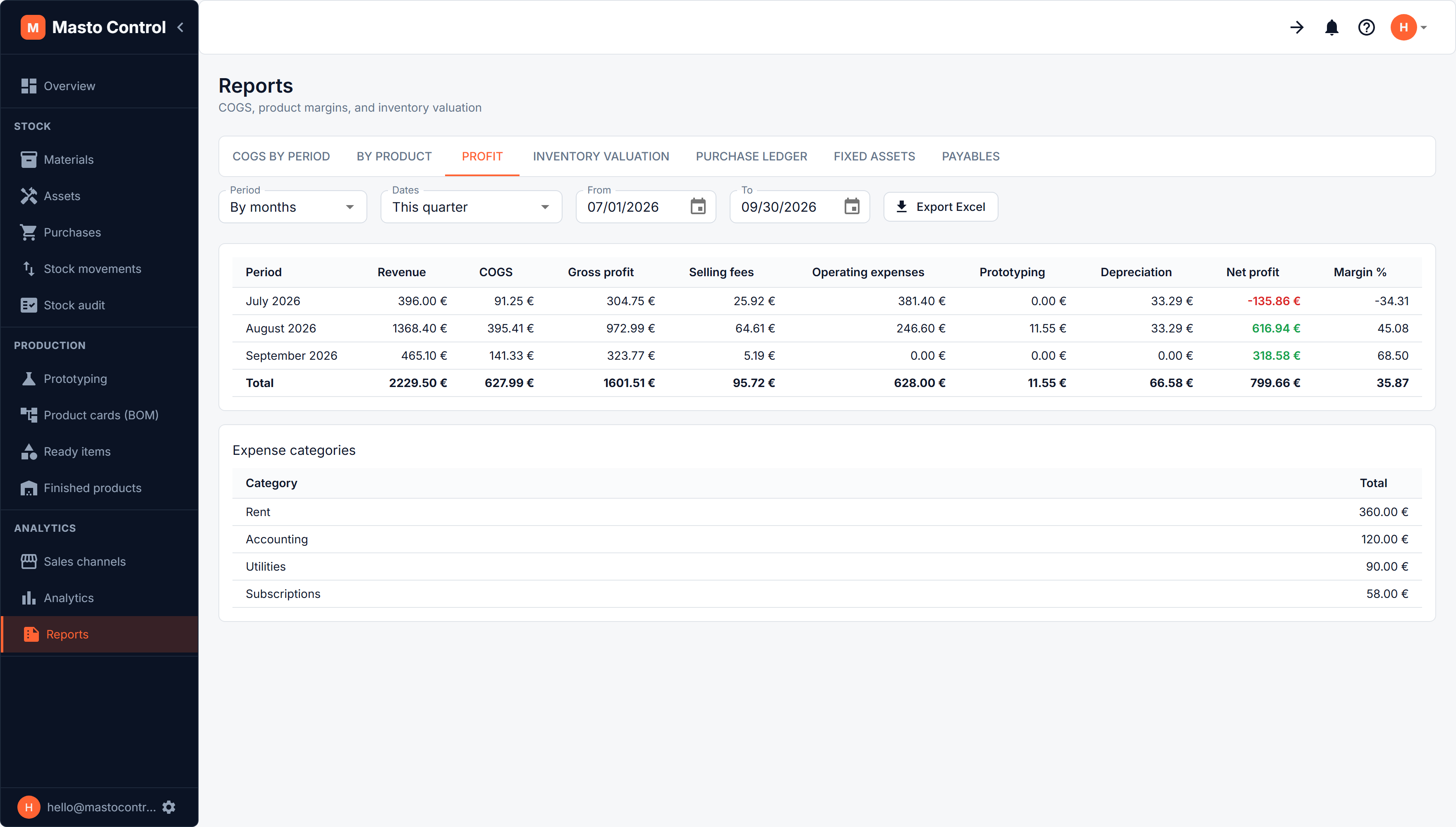
        <content type="html"><![CDATA[<p><strong>Reports</strong> now covers the questions an accountant asks, not only the ones a maker asks: a <strong>Profit</strong> report from revenue down to net profit, <strong>inventory valuation</strong> as of a date you choose, a <strong>purchase ledger</strong> split into stock, tools and expenses, a <strong>fixed-asset register</strong> with depreciation, and <strong>payables</strong> by age. Later additions are the <strong>sales ledger</strong> and <strong>receivables</strong>.</p>
<p>Every report exports to Excel.</p>
<p><img decoding="async" loading="lazy" alt="The Profit report: revenue, cost of goods, expenses and depreciation down to net profit" src="https://docs.mastocontrol.com/assets/images/report-profit-5245ed1d24c201e617068ecc2ae54509.png" width="3520" height="2000" class="img_ev3q"></p>
<p><a class="" href="https://docs.mastocontrol.com/sales-channels/reports">Reports</a></p>]]></content>
        <category label="Reports" term="Reports"/>
    </entry>
    <entry>
        <title type="html"><![CDATA[Prototyping]]></title>
        <id>https://docs.mastocontrol.com/changelog/2026/09/05/prototyping</id>
        <link href="https://docs.mastocontrol.com/changelog/2026/09/05/prototyping"/>
        <updated>2026-09-05T00:00:00.000Z</updated>
        <summary type="html"><![CDATA[Before something is a product it is an idea, and finding out whether it works costs real wax. Prototyping is where those ideas live: a recipe without the commercial half (no packaging, no channel prices), the samples you actually poured, and what every attempt cost.]]></summary>
        <content type="html"><![CDATA[<p>Before something is a product it is an idea, and finding out whether it works costs real wax. <strong>Prototyping</strong> is where those ideas live: a recipe without the commercial half (no packaging, no channel prices), the samples you actually poured, and what every attempt cost.</p>
<p>When an idea works you promote it to a product card; when it does not, you reject it and the cost is still on record.</p>
<p><img decoding="async" loading="lazy" alt="The prototypes list, with the samples made from one of them" src="https://docs.mastocontrol.com/assets/images/prototyping-list-b1df3573994a843d3d0b0cdab4ca8ef6.png" width="3520" height="2000" class="img_ev3q"></p>
<p><a class="" href="https://docs.mastocontrol.com/production/prototyping">Prototyping</a></p>]]></content>
        <category label="Production" term="Production"/>
        <category label="Costing" term="Costing"/>
    </entry>
    <entry>
        <title type="html"><![CDATA[Tools and equipment that wear out]]></title>
        <id>https://docs.mastocontrol.com/changelog/2026/09/05/tools-and-equipment</id>
        <link href="https://docs.mastocontrol.com/changelog/2026/09/05/tools-and-equipment"/>
        <updated>2026-09-05T00:00:00.000Z</updated>
        <summary type="html"><![CDATA[A melter, a bench scale, a label printer what it cost, how much it has depreciated, what it is worth now, and, when it finally goes, why.]]></summary>
        <content type="html"><![CDATA[<p>A melter, a bench scale, a label printer: things you own and keep are not stock, and now they are not treated like it. Each item has its own record under <strong>Assets</strong>: what it cost, how much it has depreciated, what it is worth now, and, when it finally goes, why.</p>
<p>Depreciation is straight-line and charged monthly. One button catches every item up to the end of last month, and a month is never charged twice. A tool bought on the same receipt as your materials becomes an asset rather than stock.</p>
<p><img decoding="async" loading="lazy" alt="The assets list: what each kind cost, what it has depreciated and what it is worth now" src="https://docs.mastocontrol.com/assets/images/assets-list-b0c00d15fed8fa3f5f5e35cf6f58760c.png" width="3520" height="2000" class="img_ev3q"></p>
<p><a class="" href="https://docs.mastocontrol.com/purchases-and-costs/assets">Tools and equipment</a></p>]]></content>
        <category label="Purchasing" term="Purchasing"/>
        <category label="Costing" term="Costing"/>
    </entry>
</feed>